Google has recently rolled out a new filter in Search Console that’s cold prove really useful for small businesses. It’s called the branded queries filter, it’s now available to all eligible sites, and it answers a question that’s always been surprisingly hard to answer: how much of your search traffic comes from people who already knew you existed?

Branded vs non-branded – what does that actually mean?
A branded query is any search that includes your business name or a close variation of it. Someone typing “ABC HR Consulting” or “ABC HR” into Google is a branded search. They already know you. They’re looking for you specifically.
A non-branded query is everything else. “HR consultancy Sheffield.” “Employment law advice for small businesses.” “How to handle a redundancy process.” These are people who don’t know you yet. They have a problem, they’re searching for a solution, and your website either shows up or it doesn’t.
Until now, all of this was mixed together in your Search Console performance report. You could filter by individual keywords, but separating branded from non-branded across all your data in one click wasn’t possible. Now it is.
Why this matters for your SEO
Branded traffic is largely predictable. People searching for your business name were probably going to find you anyway – through word of mouth, a referral, a business card, a LinkedIn connection. It’s valuable, but it’s not really what SEO is for.
Non-branded traffic is where SEO earns its keep. These are genuinely new people. They didn’t know you existed an hour ago. Your content, your rankings, your visibility in search – that’s what put you in front of them.
If you’ve been investing in SEO and your overall traffic looks decent, this filter might reveal something uncomfortable: that most of it is branded. Existing clients and contacts finding their way back to your site. Which is fine, but it means your SEO isn’t doing the job of reaching new audiences yet.
Conversely, if your non-branded traffic is growing steadily, that’s a really good sign. New people are finding you for things they’re searching for. That’s SEO working.
Where to find it and what to do with it
Log into Google Search Console. Go to the Performance report. Click the filter options at the top – you’ll see “Branded queries” and “Non-branded queries” as new options alongside the standard keyword filter. Apply each one in turn and note what you see.
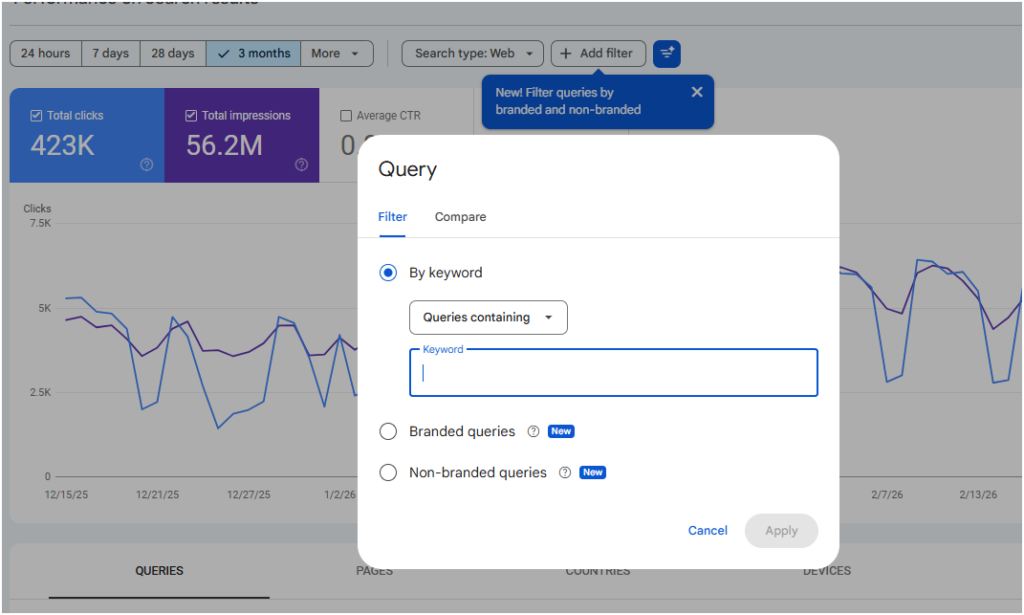
If you can’t see the filter at all, there are two likely reasons. It’s not available for subdomain or subfolder properties – so if your Search Console is set up for something like yoursite.com/blog rather than yoursite.com, you won’t see it. It also requires a sufficient volume of impressions, so very new or very small sites may not have it yet.
A few things worth looking at once you’ve filtered:
- What are your top non-branded queries? These are the searches where you’re genuinely competing for new eyeballs. Are they the searches you’d hoped to rank for? Are there obvious gaps – topics your ideal clients would search for that aren’t showing up at all?
- What’s the click-through rate on non-branded queries? If you’re appearing in searches but not getting clicks, your page titles and descriptions might not be compelling enough to stand out.
- Is non-branded traffic growing or flat? Compare the last three months to the previous three months with the filter applied. A flat line when you’ve been putting effort into content or SEO is a signal that something needs reviewing.
One thing worth knowing: Google uses an AI-assisted system to classify queries, not a simple keyword match. So it should catch variations and misspellings of your brand name that you might not have thought to filter for manually. Occasionally it’ll misclassify something, but for a general picture it’s a solid tool.
Not sure what your numbers are telling you?
This is exactly the kind of data I look at when I’m working out why an SEO strategy is or isn’t performing. If you’d like a second pair of eyes on what your Search Console is showing you – branded, non-branded, and everything in between – let’s have a chat.