Google recently updated its documentation about how much of your web page it will crawl. Of course the SEO community started arguing about this on social media, and the ever dependable hustlebros started preparing their “URGENT: Your website might be too big for Google” posts designed to scare you into buying something.
Let me save you some time and anxiety.

What did Google change about crawl file size limits?
Google clarified that Googlebot will crawl the first 2MB of HTML files, the first 64MB of PDFs, and the first 2MB of other supported file types. There’s also a general 15MB default limit for Google’s other crawlers.
Yup, that’s the update. Some clearer documentation about limits that have been in place for ages.
Why 2MB of HTML is massive for a small business website
I get that “2MB” means nothing to most people, so let’s put this into perspective.
Think of your web page’s HTML like the script for a play. It’s just the words, the stage directions, the structure – not the costumes, the set, or the lighting. All those images, videos, and fancy design elements on your website? They’re separate files. The HTML is just the text and code that tells your browser where everything goes.
Take a look at this chart from the Web Almanac’s 2025 data:

See that tiny bar on the left? That’s HTML. The median mobile home page uses just 22KB of HTML. That’s 0.022MB. To hit Google’s 2MB crawl limit, you’d need a page about 90 times larger than a typical web page.
To put that another way, 2MB of HTML is around 2 million characters. That’s roughly the word count of a 400-page novel crammed onto a single web page. If your services page is somehow longer than the latest Mills & Boon, you’ve got bigger problems than Google’s crawl limits.
Who does this affect?
Genuinely massive websites with dynamically generated pages that pile on enormous amounts of HTML. Think sprawling e-commerce sites with thousands of product variations loaded onto a single page, or web apps that dump their entire database into the page source.
Your 10-page business website? Your blog? Your service pages? Not even close.
How to check if you should worry (you shouldn’t)
If you want to put your mind at rest, right-click on any page of your website, click “View Page Source,” then check the file size. In Chrome, you can also open Developer Tools (F12), click the Network tab, reload the page, and look at the size of the HTML document. It’ll almost certainly be well under 100KB, let alone 2MB.
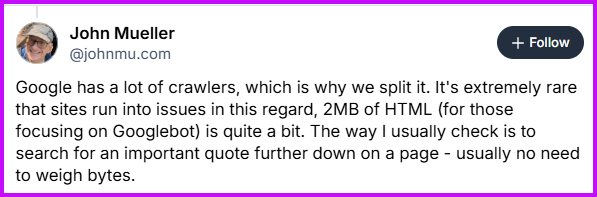
Even Google’s John Mueller weighed in, saying it’s extremely rare that sites run into issues, and that 2MB of HTML is quite a bit. His own method of checking? Searching for a quote from further down a page to see if Google’s indexed it. No need to weigh bytes.
Stop letting people scare you into spending money
Every time Google updates its documentation, a wave of “experts” descend on small business owners with urgent warnings about how their website is at risk. They’ll package this into a scary-sounding audit, charge you a few hundred quid, and tell you things you didn’t need to worry about in the first place.
If someone contacts you about your website’s HTML file size being a problem, ask them what your current HTML file size is. The HTML. Not the page size, or the size of the images – JUST the size of the html. If they can’t tell you (or won’t), they’re selling fear, not help.
Your time and budget are better spent on things that really matter – like whether your content helps your customers find what they need, whether your site loads at a reasonable speed, and whether people can navigate it without wanting to throw their laptop out of the window.
More reading: Search Engine Roundtable is talking about this too.
Want SEO updates without the panic? Sign up for my newsletter, “SEO F#cking what?!” – straight-talking SEO advice with zero hysteria.