
Executive summary
Five B2B websites built with AI tools, all audited in April 2026. Same methodology across all five: SE Ranking crawls, direct HTML source review, PageSpeed Insights, Google’s Rich Results Test, manual site review.
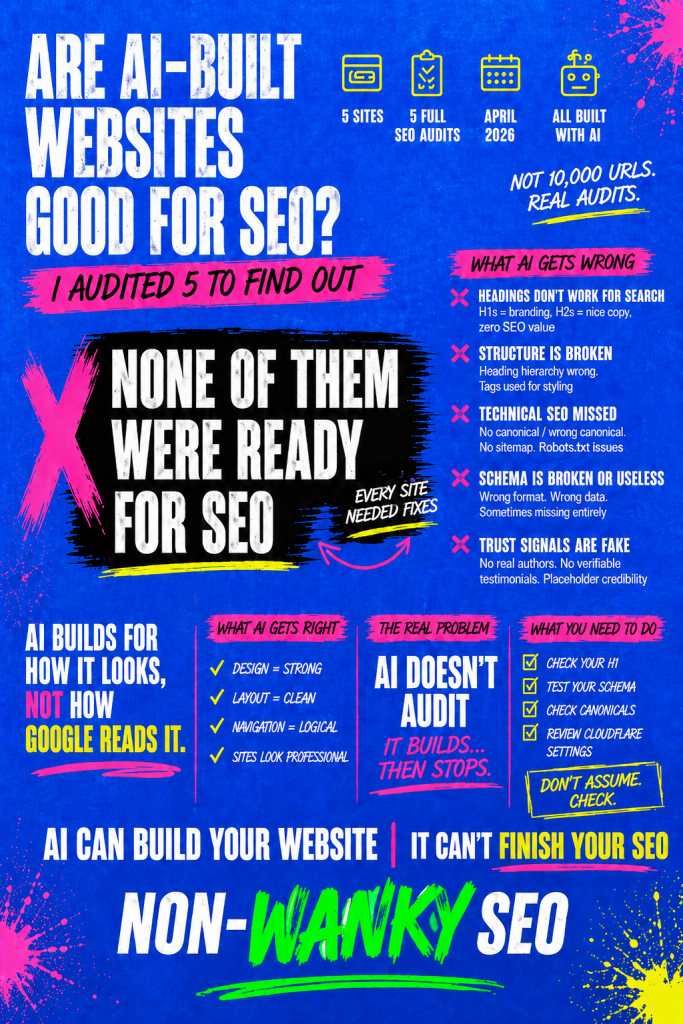
The short answer to whether AI-built websites are good for SEO: better than you might expect in some areas, worse than you’d hope in others, and consistently let down by a knowledge gap that AI makes worse, not better. The sites looked finished. They felt professional. The problems were invisible – and the people who built them had no reason to think there was anything to look for.
Heading structure was the strongest consistent finding. Every site had H1s and H2s written for how they read rather than what they signal to search engines. Other issues appearing on four or five of the five sites: broken heading hierarchy; robots.txt files missing or misconfigured; sitemaps missing or broken; category and tag pages indexed when they shouldn’t be; schema absent or incorrectly implemented; mobile performance significantly weaker than desktop; trust signals structurally present but unverifiable.
On the positive side: good design output, sensible site architecture, working functional elements, correct mobile layouts, and in several cases thoughtful commercial pages. The foundations are solid. The configuration on top of those foundations is where the problems live.
The through line across all of it: AI builds. It doesn’t audit. And it doesn’t tell you it hasn’t.

About this study
Five websites. Five free SEO audits. All built with AI tools, all B2B, all audited in April 2026.
I want to be upfront about the sample size before we go any further. This is not a study of 500 websites. It’s not a scrape of 10,000 URLs run through an automated tool and dressed up as research. It’s five proper, thorough audits – the kind I do for other clients – carried out on sites where the owners had told me that AI had built the site.
Each audit followed the same process.
- I ran two crawls of every site using SE Ranking – one with default settings, one with JavaScript rendering enabled – because JavaScript-heavy frameworks can produce false positives on a standard crawl that disappear when the JS is rendered properly.
- I reviewed the homepage HTML source directly using the SEO Meta in 1 Click browser extension, which shows the actual heading structure, meta title tag, meta description, canonical tag, and robots directives as Google reads them rather than as they appear on screen.
- I checked Google’s index using a site: search to see what had been indexed, how many pages, and what Google was showing as titles and descriptions in the results.
- I ran PageSpeed Insights on both mobile and desktop for each site, and reviewed the expanded diagnostics.
- I tested schema markup using Google’s Rich Results Test on the homepage, any key commercial pages, and at least one blog post per site.
- And then I looked at the site and the HTML itself with my very own eyes- scrolling through it as a visitor would, reading the copy, checking the links, looking at the things tools don’t catch.
The audits were also put together using a Claude AI project I’ve built and trained to approach websites the way I do. I mention this partly for transparency and partly because it’s relevant context – I’m using AI to put together an audit for sites built by AI, which means I’m not coming at this from a position of AI scepticism. I use it myself.
The sites in this study are anonymised. The people who received these audits gave me permission to use the findings for research purposes, and I’ve been careful not to include anything that would identify them. Where I describe a specific finding, I’ve generalised it enough to remove the identifying detail while keeping the substance of what I found.
A note on what these sites have in common: they’re all B2B, they’re all relatively small (none of them are enterprise-scale), and they cover a range of site types – a single-page personal brand site, a multi-page freelancer site, two SaaS products, and a larger platform site with a substantial content library. The AI tools used to build them varied, though in most cases I only knew that AI was involved rather than which specific tool. Site sizes ranged from a handful of pages to several hundred.
What this study cannot tell you is whether these findings hold across all AI-built websites, across all industries, or at enterprise scale. Five sites is a starting point, not a definitive verdict. What it can tell you is what I actually found, with real data, on five real sites – and the patterns that emerged were consistent enough to be worth writing up properly.
The sites I audited
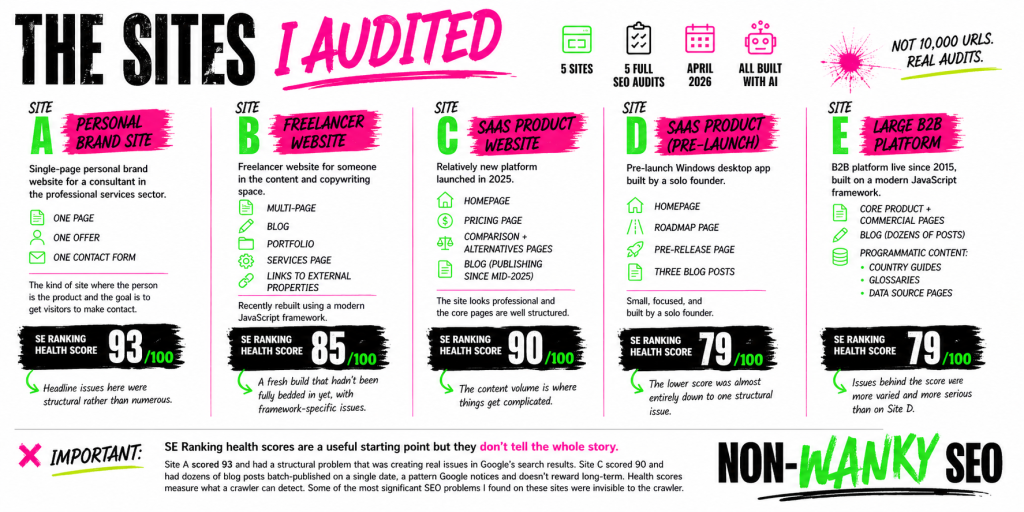
All five sites are B2B. Beyond that, they’re quite different from each other – which is part of what makes the consistent patterns worth paying attention to.
Site A is a single-page personal brand website for a consultant in the professional services sector. One page, one offer, one contact form. The kind of site where the person is the product and the goal is to get visitors to make contact. SE Ranking gave it a health score of 93 out of 100, which sounds healthy – and in narrow technical terms, it mostly was. The headline issues here were structural rather than numerous.
Site B is a freelancer website for someone in the content and copywriting space. Multi-page, with a blog, a portfolio section, a services page, and links to external properties. Recently rebuilt using a modern JavaScript framework. SE Ranking health score of 85. A fresh build that hadn’t been fully bedded in yet, with some specific technical issues that stemmed directly from the framework choices made during the build.
Site C is a SaaS product website – a relatively new platform launched in 2025, with a homepage, a pricing page, comparison and alternatives pages, and a blog that had been publishing content since mid-2025. SE Ranking health score of 90. The site looks professional and the core pages are well structured. The content volume is where things get complicated.
Site D is another SaaS product – a pre-launch Windows desktop app with a homepage, a roadmap page, a pre-release page, and three blog posts. Small, focused, and built by a solo founder. SE Ranking health score of 79. The lower score was almost entirely down to a single structural issue that, once fixed, would clear the majority of the errors on its own.
Site E is the largest and most complex site in the group – a B2B platform that’s been live since 2015, built on a modern JavaScript framework, with core product and commercial pages, a blog with dozens of posts, and a substantial library of programmatic content including country guides, glossaries, and data source pages. SE Ranking health score of 79 – though in this case the issues behind that score were more varied and more serious than on Site D.
One thing worth noting before we get into the findings: the SE Ranking health scores are a useful starting point but they don’t tell the whole story. Site A scored 93 and had a structural problem that was creating real issues in Google’s search results. Site C scored 90 and had dozens of blog posts batch-published on a single date, a pattern Google notices and doesn’t reward long-term. Health scores measure what a crawler can detect. Some of the most significant SEO problems I found on these sites were invisible to the crawler.
What I found: the consistent patterns
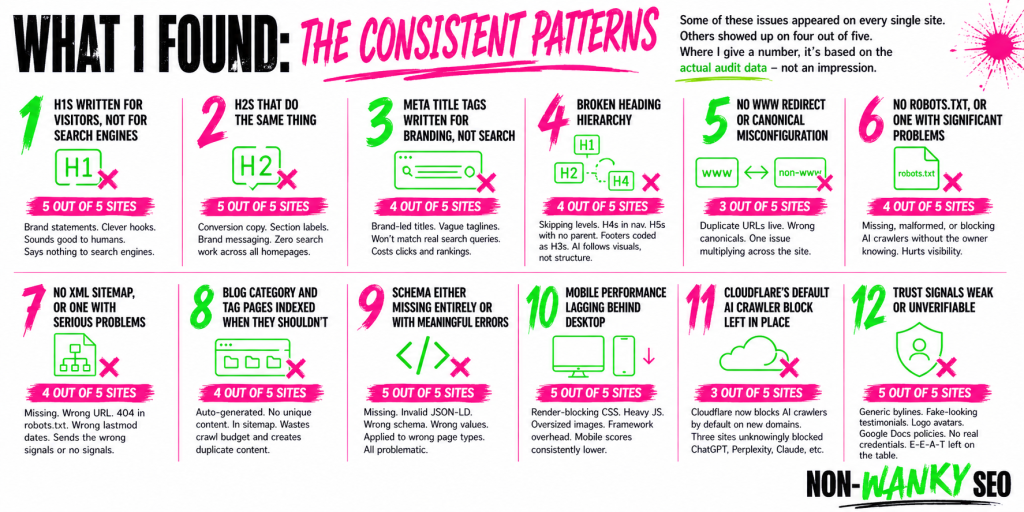
Some of these issues appeared on every single site. Others showed up on four out of five. Where I give a number, it’s based on the actual audit data – not an impression, not a rough sense, but what I found when I went through each site methodically.
H1s written for visitors, not for search engines – 5 out of 5 sites
This is the finding I keep coming back to, because it was universal. Every site. Not one exception.
The H1 is the single most important on-page signal search engines use to understand what a page is about. It should tell Google – and the people searching – what this page covers and who it’s for. On every AI-built site I audited, the H1 on the homepage was a brand statement or a piece of conversion copy. A strong line. A clever hook. Something that sounds good when you read it. Something nobody would ever type into a search engine.
A few examples – paraphrased to protect anonymity, but representative of what I actually found: a leadership consultant whose H1 talked about transformation rather than what she does or who she works with. A SaaS product whose H1 was a witty one-liner about why their competitors’ customers were losing deals – great for a sales deck, useless as a search signal. A freelancer whose H1 was a provocation designed to resonate with their target audience, not a signal about their services. One site’s H1 was simply the brand name, nothing else.
These are all reasonable creative choices. Some of them work well as copy. None of them are search signals. Search engines read the H1 and ask: what is this page about? What problem does it solve? Who is it for? Every one of those H1s answers a different question entirely.
This isn’t a problem unique to AI-built sites – I see weak H1s on human-built sites every single day. But if there’s one thing you’d expect an AI website builder to get right, it’s this. Matching a page to what people actually search for is exactly the kind of pattern recognition AI is supposed to be good at. The fact that it consistently produces H1s optimised for how they read rather than what they signal to search engines is notable – and so is the fact that when a user brings their own clever copy to the build, AI accepts it without question rather than flagging that it won’t work for search. A human SEO would push back. AI just builds.
H2s that do the same thing – 5 out of 5 sites
The H1 problem doesn’t stop at the H1. Every site had the same pattern running through the H2s: conversion copy, section labels, brand messaging.
To be clear – not every H2 on a page needs to target a search query. That’s not how good on-page SEO works. H2s have multiple jobs: signposting sections, supporting the narrative, helping visitors scan the page. Some of those jobs have nothing to do with search.
The issue here is the totality of it. Across five homepages, not one H2 on any of them was doing any search work at all. Every single heading was written purely for the reader – which sounds like it should be fine, and in isolation it would be. But combined with H1s that aren’t pulling their weight either, you end up with a homepage where the entire heading structure is invisible to search engines as a search signal. That’s the problem.
And the same caveat applies as it does to H1s – a person asking an AI to build them a website optimised for search should reasonably expect the AI to either produce some search-friendly headings or at least flag when the copy it’s been given won’t serve that purpose. It doesn’t do either.
Meta title tags written for branding, not search – 4 out of 5 sites
The meta title tag is what appears in search results as the clickable headline for your page. It’s often the first thing a potential customer sees before they’ve visited your site. On four of the five sites, the homepage meta title tag had the same problem as the H1 – it was written as a branding statement rather than a search signal.
A meta title tag should tell someone scanning search results exactly what the page is and whether it’s relevant to what they searched for. On several of these sites it led with the brand name, followed by a tagline or a vague descriptor that wouldn’t match any realistic search query. On one site the meta title tag and the H1 were effectively saying the same thing in two different places – both brand-led, both search-blind.
This matters because the meta title tag is one of the clearest signals you can send to both search engines and searchers about what a page covers. Getting it wrong doesn’t just affect rankings – it affects whether someone who does find you in the results decides to click.
Broken heading hierarchy – 4 out of 5 sites
Beyond the content of the headings, the structure itself was broken on four of the five sites. Heading levels skipping from H2 to H4. H4s appearing in navigation menus before the H1 appears in the document. H5s used for pricing tiers with no logical parent heading above them. Footer navigation links coded as H3 tags.
This happens because AI picks heading levels based on how things look rather than what they mean in the document structure. A heading tag is a semantic signal – it tells search engines and screen readers about the hierarchy of information on the page. When AI makes something look like a subheading by giving it a smaller font size and assigns it an H4, it’s following visual logic rather than structural logic. Search engines read the code, not the visual output.
No www redirect or canonical misconfiguration – 3 out of 5 sites
Three sites had problems with how their preferred URL was configured. On two of them, both the www and non-www versions of every page were live and accessible with no redirect between them and no canonical tags telling search engines which version to treat as authoritative. The result is that search engines may see every page as existing at two separate URLs with identical content. On one of those sites, this single structural problem was responsible for the majority of the error count in the SE Ranking crawl – what looked like dozens of separate issues was actually one problem multiplying across every URL on the site.
On a third site the canonical tag existed but pointed to the wrong version of the URL.
No robots.txt, or one with significant problems – 4 out of 5 sites
Four sites either had no robots.txt at all or had one that was actively causing problems. One had a conflict between Cloudflare-managed directives blocking AI crawlers and manual rules trying to allow them – the manual rules lost, meaning the site was blocking GPTBot, ClaudeBot, and Perplexity without the owner knowing. Another had directives in the robots.txt that search engines don’t recognise as valid, which was flagging the file as malformed and pulling down the site’s PageSpeed SEO score.
The one site that got this right went further than most – explicitly permitting AI crawlers across the board, a deliberate decision that made sense given what the product does.
No XML sitemap, or one with serious problems – 4 out of 5 sites
Two sites had no sitemap at all. Two had sitemaps with problems significant enough to undermine their purpose. On one, the sitemap was at a non-standard URL that crawlers wouldn’t find automatically – and the robots.txt was pointing to a different sitemap URL that returned a 404. On another, every URL in the sitemap was showing a last modified date from several months earlier, regardless of when the page was actually updated – posts published recently were carrying an old date, telling search engines the content hadn’t changed when it had.
It’s worth flagging the opposite problem too, because it’s equally common: sitemaps where the last modified date is dynamically set to today’s date every time the sitemap is generated. That sends search engines a signal that every page on the site has just been updated, which is almost never true. Both are wrong. One says nothing has changed when things have. The other says everything has changed when it hasn’t. Search engines need accurate lastmod dates to prioritise what to recrawl – feeding bad data in either direction is counterproductive.
Blog category and tag pages indexed when they shouldn’t be – 4 out of 5 sites
Four sites had category or tag pages indexed and included in the sitemap. These are auto-generated index pages with no unique content of their own – they exist to organise posts within the CMS, not to rank for anything. Having them in Google’s index creates unnecessary duplication and dilutes the crawl budget available for pages that actually matter.
This connects to a broader sitemap hygiene problem that appeared across most of the sites – sitemaps populated with pages that have no business being there. Paginated blog pages, noindexed pages, tag archives. The sitemap should be a curated list of the pages you want search engines to find and index. On several of these sites it was closer to a full inventory of everything the CMS had generated, whether it was useful or not.
Schema either missing entirely or with meaningful errors – 5 out of 5 sites
Every site had a schema problem, though the nature of the problem varied considerably. One site had no structured data anywhere – not a single schema block across the entire site. The others had all attempted schema, which is more than many non-AI-built sites manage, but the execution had gone wrong in different ways on each one.
On one site, the Article schema on every blog post had been written as a JavaScript function inside a JSON-LD block. JSON-LD must contain pure JSON – not JavaScript. Search engines can’t parse it. Every blog post on that site is ineligible for Article rich results as a result. On another, the SoftwareApplication schema had the product price set to zero, telling search engines the product is free when it isn’t. On a third, Article schema had been applied as a global template to every page type including the pricing page – so search engines were being told a page designed to convert prospects into customers was a piece of editorial content.
The pattern across all five is consistent: schema was either absent or broken in ways that suggest AI treats it as something to attempt rather than something to get right. The intent was sometimes there. The understanding wasn’t.
Mobile performance lagging behind desktop – 5 out of 5 sites
Every site performed significantly better on desktop than on mobile in PageSpeed Insights. The gap ranged from moderate to severe. Desktop scores were generally decent. Mobile scores told a different story – render-blocking CSS, third-party scripts loading eagerly before they’re needed, images served at far larger dimensions than they’re displayed at, JavaScript frameworks adding overhead that hits mobile connections harder.
The most striking individual finding here was one site where desktop performance scored 50 and mobile scored 74 – the inverse of the usual pattern, caused by a specific JavaScript routing implementation that was blocking the main thread for nearly three seconds on desktop. That’s unusual. The more common pattern is a desktop score in the 90s and a mobile score in the 60s or 70s, which is where three of the five sites landed.
One site scored 100 on desktop. Its mobile score was 78.
Cloudflare’s default AI crawler block left in place – 3 out of 5 sites
In July 2025, Cloudflare changed its default settings so that new domains automatically block AI crawlers. Three of the five sites were on Cloudflare and all three had this default in place, meaning tools like ChatGPT, Perplexity, and search engines’ AI features couldn’t access the site’s content. None of the site owners had made a conscious decision to block AI crawlers – they’d simply never reviewed the default setting.
To be clear – this isn’t a problem specific to AI-built sites. Any site set up on Cloudflare after July 2025 would have the same issue regardless of how it was built. It’s in this study because it came up on three of the five sites and it’s worth knowing about. Whether to block or allow AI crawlers is a legitimate choice. Having it made for you by a default setting you didn’t know existed is a different matter.
Trust signals weak or unverifiable – 5 out of 5 sites
Every site had something in this category. Generic author bylines with no biography or credentials. Testimonials with no surnames, no company names, no way to verify whether the people quoted are real. Author avatars using the brand logo instead of a photo of the actual person. Privacy policies hosted on Google Docs. Blog posts with no author information beyond a name and a date.
Google’s E-E-A-T framework – Experience, Expertise, Authoritativeness, Trustworthiness – places increasing weight on being able to verify who created content and whether that person has genuine credentials. AI builds the structure for trust signals. It doesn’t populate them with anything a sceptical prospect, or Google, could actually verify.
What AI got right
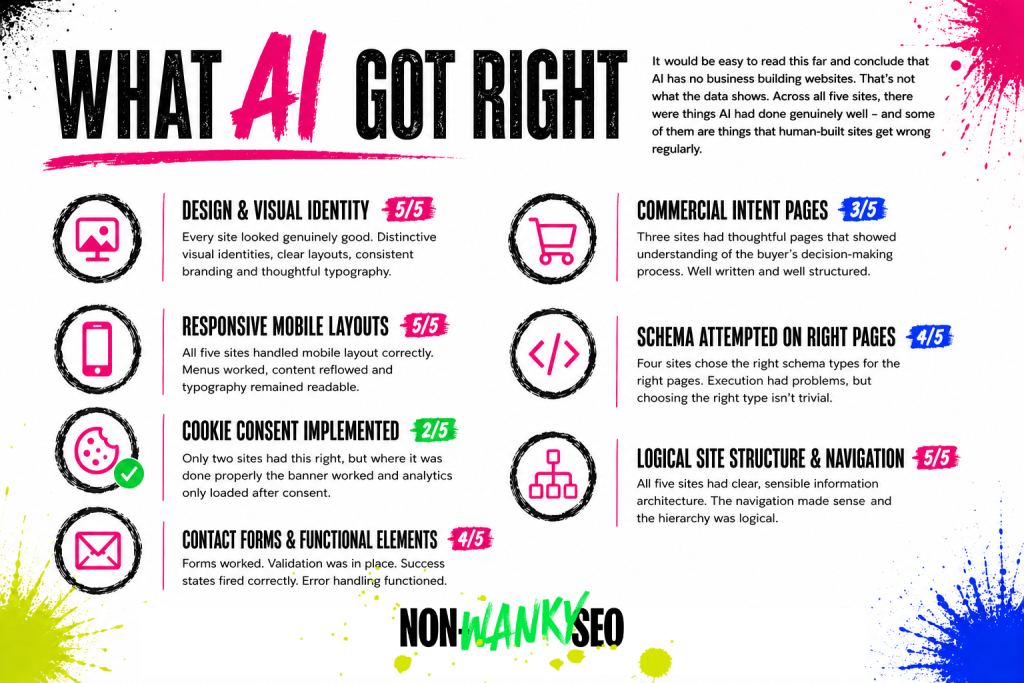
It would be easy to read this far and conclude that AI has no business building websites. That’s not what the data shows. Across all five sites, there were things AI had done genuinely well – and some of them are things that human-built sites get wrong regularly.
Design and visual identity – 5 out of 5 sites
Every single site looked good. Not “acceptable for something built by a machine” good – genuinely good. Distinctive visual identities, clear layouts, consistent branding, typography that had clearly been thought about. None of them looked like each other, and none of them looked generic. For business owners who previously couldn’t afford a professionally designed website, this is a real and significant win.
Responsive mobile layouts – 5 out of 5 sites
All five sites handled mobile layout correctly. Hamburger menus worked, content reflowed sensibly at smaller screen sizes, typography remained readable. The mobile performance scores were poor across the board, but the mobile design was solid across the board. These are different things and it’s worth separating them.
Cookie consent implemented correctly – 2 out of 5 sites
Only two sites had this right, so it’s not a universal win – but it’s worth calling out because getting cookie consent correct is something a lot of sites, built by humans and AI alike, get wrong. On the sites where it was done properly, the banner appeared, accept and decline both worked, and analytics only loaded after consent. That’s the correct implementation.
Commercial intent pages – 3 out of 5 sites
Three sites had thoughtful commercial pages that demonstrated real understanding of the buyer’s decision-making process. Comparison pages, alternatives pages, “is this right for you” pages – the kind of content that serves people who are actively evaluating options rather than just browsing. These pages were well written and well structured. Whether AI wrote them or assisted with them, the output was good.
Schema attempted on the right page types – 4 out of 5 sites
Four sites had made a genuine attempt at schema markup, and in most cases the right schema types had been chosen for the right pages. SoftwareApplication on product pages, Article on blog posts, FAQPage on pages with FAQ sections, Person schema on personal brand sites. The execution had problems on every one of them – but choosing the right schema type for the right page is not a trivial thing, and AI was getting that part right more often than not.
Logical site structure and navigation – 5 out of 5 sites
All five sites had clear, sensible information architecture. The navigation made sense, the page hierarchy was logical, and a first-time visitor could work out what the site was about and where to go. This sounds like a low bar. It isn’t. Plenty of human-built sites fail it.
Contact forms and functional elements – 4 out of 5 sites
Forms worked. Validation was in place. Success states fired correctly. Error handling functioned. For anyone who has inherited a site where the contact form has been silently broken for six months and nobody noticed, a working form is not something to take for granted.
What AI got wrong
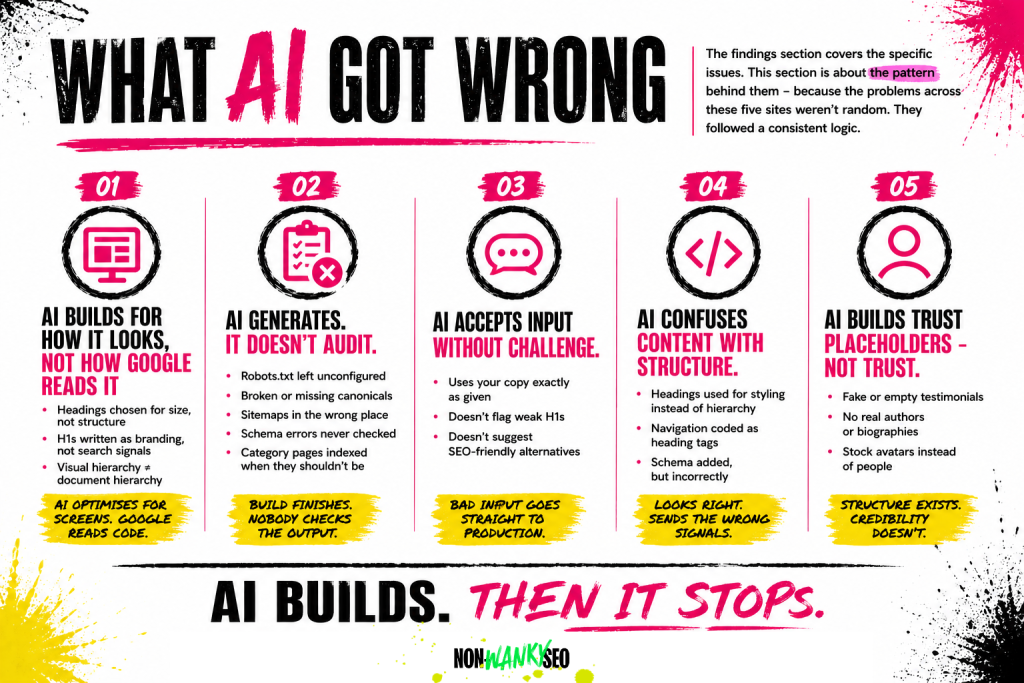
The findings section covers the specific issues. This section is about the pattern behind them – because the problems across these five sites weren’t random. They followed a consistent logic, and understanding that logic is more useful than a list of things to fix.
AI builds for how things look, not how they’re read by search engines
This runs through almost every finding in this study. The heading hierarchy problems, the H1s that prioritise copy over search signals, the heading levels chosen for visual size rather than document structure – all of them stem from the same root cause. AI is optimising for the screen. Search engines read the code. Those are two different things, and AI consistently prioritises the former.
AI generates. It doesn’t audit.
The most common theme across all five sites wasn’t any specific technical error. It was the absence of a post-launch check. Robots.txt files left unconfigured. Sitemaps at non-standard URLs. Canonical tags pointing to the wrong version of a URL. Category pages indexed when they shouldn’t be. Schema blocks with errors that a five-minute test in Google’s Rich Results Test would have caught.
None of these are difficult problems. They’re problems that exist because AI finishes the build and stops. It doesn’t go back through its own output and ask whether everything is configured correctly. A human would – or should. With an AI-built site, that step has to be a conscious, deliberate addition to the process. On every site in this study, nobody knew it was needed.
AI accepts what it’s given without questioning whether it works for search
This came up most clearly in the heading structure findings. When a business owner brings their own copy to an AI website builder – a clever H1, a witty brand line, a section heading they’re proud of – the AI takes it and uses it. It doesn’t flag that the H1 won’t serve as a search signal, or suggest an alternative that does both jobs. It builds what it’s given. For someone who doesn’t know that their brilliant tagline is invisible to search engines, that silence is a problem.
AI doesn’t understand the difference between content and structure
The schema errors, the heading tags used for styling rather than document hierarchy, the navigation labels coded as H4s – these all point to the same gap. AI understands what things should look like. It doesn’t always understand what things mean in the context of how search engines read a page. A heading tag isn’t just a way to make text bigger. A schema block isn’t just metadata to fill in. These are signals, and getting them wrong or leaving them broken sends search engines the wrong information about what a page is and who it’s for.
AI produces trust signal placeholders, not trust signals
Author bylines without biographies. Testimonial sections without verifiable attributions. Avatar images that are brand logos rather than photographs of real people. In every case, the structure was there. The substance wasn’t. AI builds the container for trust. Filling it with something search engines and a sceptical prospect can actually verify is a human job – and on these sites, nobody had done it.
The anomaly findings
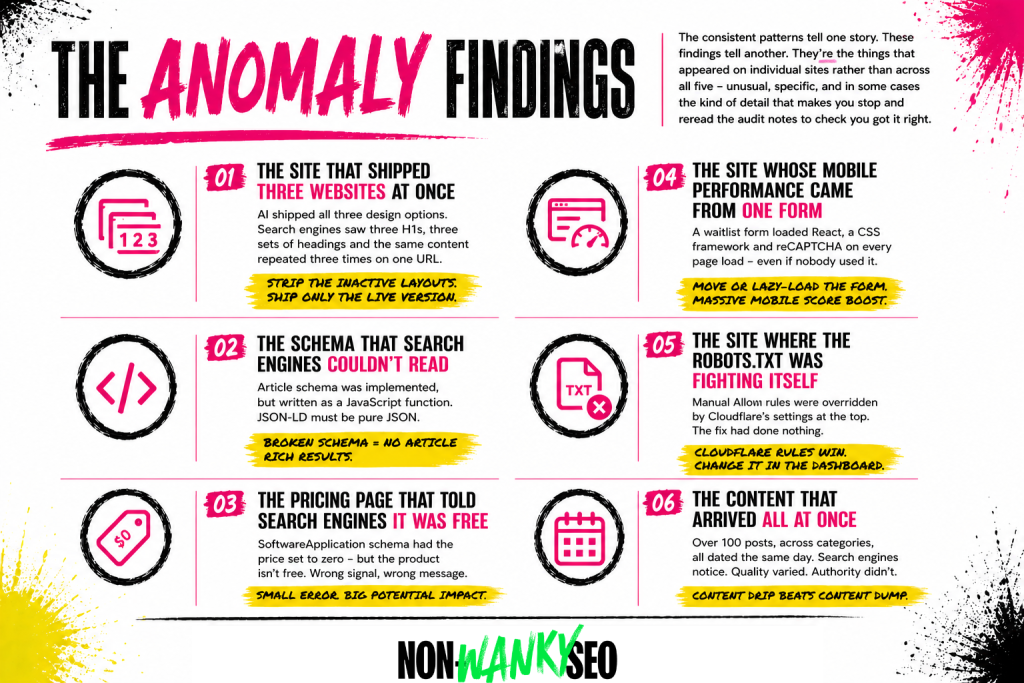
The consistent patterns tell one story. These findings tell another. They’re the things that appeared on individual sites rather than across all five – unusual, specific, and in some cases the kind of detail that makes you stop and reread the audit notes to check you got it right.
The site that shipped three websites at once
One site had been built using an AI tool that generated three complete design directions for the client to choose between. A sensible approach – being able to compare options before committing is genuinely useful. The problem is that when the chosen design went live, all three layouts went with it. Only one was visible to visitors. All three were in the HTML.
Search engines read the HTML. So what looked to a visitor like a clean, well-designed single-page site looked to a search engine like a page with three identical H1s, three complete sets of headings, and the same content repeated three times on the same URL. Not catastrophic – search engines are reasonably good at working out what’s going on – but entirely unnecessary, and the root cause of several other findings on that site. The fix is straightforward: strip out the two inactive layouts and ship only the live version as clean HTML. The fact that nobody knew to do it before the site went live is the point. You don’t know what you don’t know – and AI-assisted builds make that gap invisible.
The schema that search engines couldn’t read
On one site, every blog post had Article schema implemented – which is the right thing to do. The problem with that one site was in the execution. The schema had been written as a JavaScript function inside a JSON-LD script block. JSON-LD must contain pure JSON. Not JavaScript. Not a function. Pure JSON. Google’s Rich Results Test confirmed it couldn’t parse any of it. Every blog post on that site was ineligible for Article rich results, not because schema was missing, but because the implementation was broken in a way that’s easy to miss if you don’t know what you’re looking for. Nobody knew to check.
The pricing page that told search engines the product was free
One site had SoftwareApplication schema on its homepage – again, the right call for a software product. But the price field in the schema was set to zero. The product isn’t free. It has a monthly subscription price. The schema was telling search engines the product costs nothing, which is the kind of signal that could affect how the page appears in results and how search engines understand the product category. A small error with a potentially meaningful consequence, sitting undetected because nobody knew to check.
The site whose entire mobile performance problem came from one form
On one site, the mobile PageSpeed score was significantly lower than desktop. The culprit wasn’t images, or render-blocking CSS, or an oversized JavaScript bundle in the traditional sense. It was a single waitlist signup form embedded on the homepage. The form loaded a full React application, a CSS framework, and a reCAPTCHA integration in the background on every page load – whether or not a visitor ever scrolled to it or intended to use it. Moving the form to its own page, or lazy-loading it so it only fires when a visitor reaches it, would push the mobile score substantially higher. The AI had embedded the form. It hadn’t considered what that form was loading.
The site where the robots.txt was fighting itself
One site’s owner had noticed that AI crawlers were being blocked and had manually added rules to the robots.txt to allow them. Reasonable response to a real problem. The issue is that the Cloudflare-managed section at the top of the robots.txt was doing the blocking – and Cloudflare’s directives take precedence over anything added below them. The manual Allow rules were being overridden before they could take effect. The site was still blocking GPTBot, ClaudeBot, and Perplexity, the owner believed they’d fixed it, and the fix had done nothing. Sorting it required going into the Cloudflare dashboard directly – not editing the robots.txt.
The content that arrived all at once
One site had published a substantial volume of blog content – over a hundred posts across multiple categories. Looking at the sitemap, the vast majority of those posts carried the same date. Not similar dates. The same date. Dozens of posts on completely different topics, all dated the same day, all live simultaneously.
Search engines notice this. A site that publishes a large volume of content in a single batch looks different from a site that builds a content library steadily over time – particularly when that site is relatively new and hasn’t yet established the kind of authority that would make a large content drop credible. The content itself varied in quality. The older posts were noticeably thinner than the more recent ones. The pattern of how it arrived didn’t help.
What this means if you’re thinking about using AI to build your site
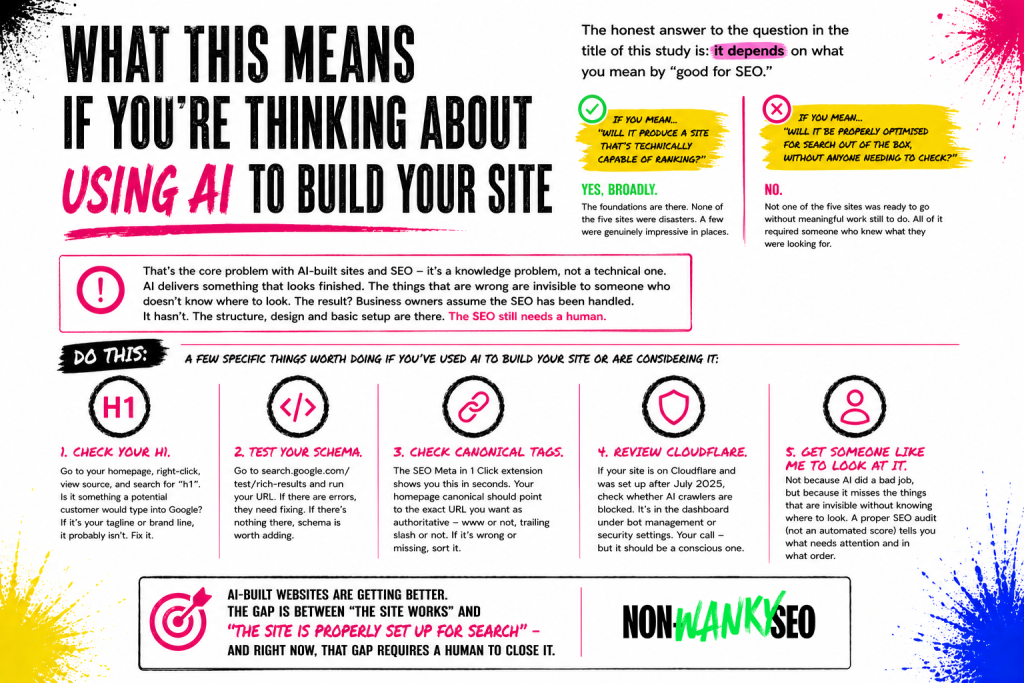
The honest answer to the question in the title of this study is: it depends on what you mean by “good for SEO.”
If you mean “will it produce a site that’s technically capable of ranking” – yes, broadly. The foundations are there. The sites in this study were indexable, fast enough on desktop, structurally logical, and in most cases had made some attempt at the right technical SEO elements. None of them were disasters. A few of them were genuinely impressive in places.
If you mean “will it produce a site that’s been properly optimised for search out of the box, without anyone needing to check” – no. Not one of the five sites in this study was ready to go from an SEO perspective without meaningful work still to do. Some of that work was minor. Some of it was significant. All of it required someone who knew what they were looking for.
That’s the core problem with AI-built sites and SEO, and it’s not really a technical problem. It’s a knowledge problem. When a human developer or designer builds a site badly, the person commissioning it often has enough context to know something feels off – the form doesn’t work, the page loads slowly, the navigation doesn’t make sense. When an AI builds a site, it looks right. It feels professional. The things that are wrong are invisible to someone who doesn’t know where to look. The canonical tag pointing to the wrong URL doesn’t show up on screen. The schema that search engines can’t parse doesn’t affect how the page looks. The H1 that’s doing no SEO work reads perfectly well as a headline.
This creates a specific risk for business owners who use AI to build their site and then assume the SEO has been handled. The AI delivered something that looked finished. They had no reason to think a check was needed. But it hasn’t been handled. What’s been handled is the structure, the design, the basic technical setup. The SEO – the part that involves understanding what your customers are searching for, making sure your pages are telling search engines what they need to know, and checking that everything is configured correctly – still needs a human.
A few specific things worth doing if you’ve used AI to build your site or are considering it:
Check your H1. Go to your homepage, right-click, view source, and search for “h1”. Whatever is in that tag – is it something a potential customer would type into a search engine? If it’s your tagline, your brand name, or a clever line you’re proud of, it probably isn’t. That’s worth fixing.
Test your schema. Go to search.google.com/test/rich-results, enter your URL, and see what comes back. If there are errors, they need fixing. If there’s nothing there at all, schema is worth adding.
Check your canonical tags. The SEO Meta in 1 Click browser extension will show you this in seconds. The canonical tag on your homepage should point to the exact URL you want search engines to treat as authoritative – including whether it has www or not, and whether it has a trailing slash or not. If it’s pointing somewhere else, or if it’s missing entirely, that needs sorting.
Review your Cloudflare settings. If your site is on Cloudflare and was set up after July 2025, check whether AI crawlers are blocked. It’s in the Cloudflare dashboard under the bot management or security settings. Whether you want them blocked or not is your call – but it should be a conscious decision.
Get someone like me to look at it. Not because AI has done a bad job, but because the things AI misses are specifically the things that are invisible without knowing where to look. A proper SEO audit – not an automated score, but an actual audit – will tell you what needs attention and in what order.
AI-built websites are getting better. The design output is already strong. The technical foundations are broadly solid. The gap is in the layer between “the site works” and “the site is properly set up for search” – and right now, that gap requires a human to close it.
Limitations and methodology notes
A few specific limitations worth knowing about beyond what’s covered in the methodology section above.
I don’t know which AI tools were used to build most of these sites. In some cases I knew a specific tool or framework was involved because the code flagged it (Astro, for example). In others I knew only that AI had been used. This means I can’t draw conclusions about whether specific AI website builders perform better or worse than others, or whether the findings here are consistent across different tools.
The audits were conducted as free audits, which means they were thorough but not exhaustive. I didn’t crawl every page on every site, test every link, or conduct full keyword research for each one. The findings reflect what a thorough free audit covers – technical SEO, on-page SEO, performance, schema, and trust signals – not every possible dimension of SEO health.
The methodology was consistent across all five sites but it wasn’t automated. Different auditors using different tools might weight findings differently or catch things I missed. I’ve tried to be specific about what I found and how I found it so the methodology is replicable, but I can’t claim it’s objective in the way that a purely automated study would be.
Finally – and this is worth saying again clearly – I used AI to help compile these audits. I’ve built and trained a Claude project that approaches websites the way I do, and I used it as part of the audit process on all five sites. The irony of using AI to identify problems with AI-built websites isn’t lost on me. I mention it because transparency about methodology matters, and because it means I’m not approaching this from a position of AI scepticism. I use it. I just also know what it misses.
What this means for me
Doing these five audits back to back changed how I think about AI-built sites – not because the findings were shocking, but because the pattern was so consistent. I went in expecting a mixed picture. What I found was the same gaps, in roughly the same places, on every site. That tells you something about where AI website builders are right now: genuinely impressive at the visible stuff, quietly unreliable at the configuration layer underneath it.
If you’ve used AI to build your site and this has made you wonder what’s sitting underneath the surface, a 1:1 SEO session is the fastest way to find out. We can go through your site in detail, work out what needs attention, and make sure you know exactly what to do and why.